
A local professional office called us about something that sounded small: a few emails from potential clients had gone missing. When we dug in, we found a much bigger problem. Their own website was quietly trying to infect the computers of people who visited it. Nobody at the office knew, because the attack was designed to stay hidden from them.
We're sharing what we found, without naming the business, because this attack is common, hard to spot, and aimed at small business websites like theirs.
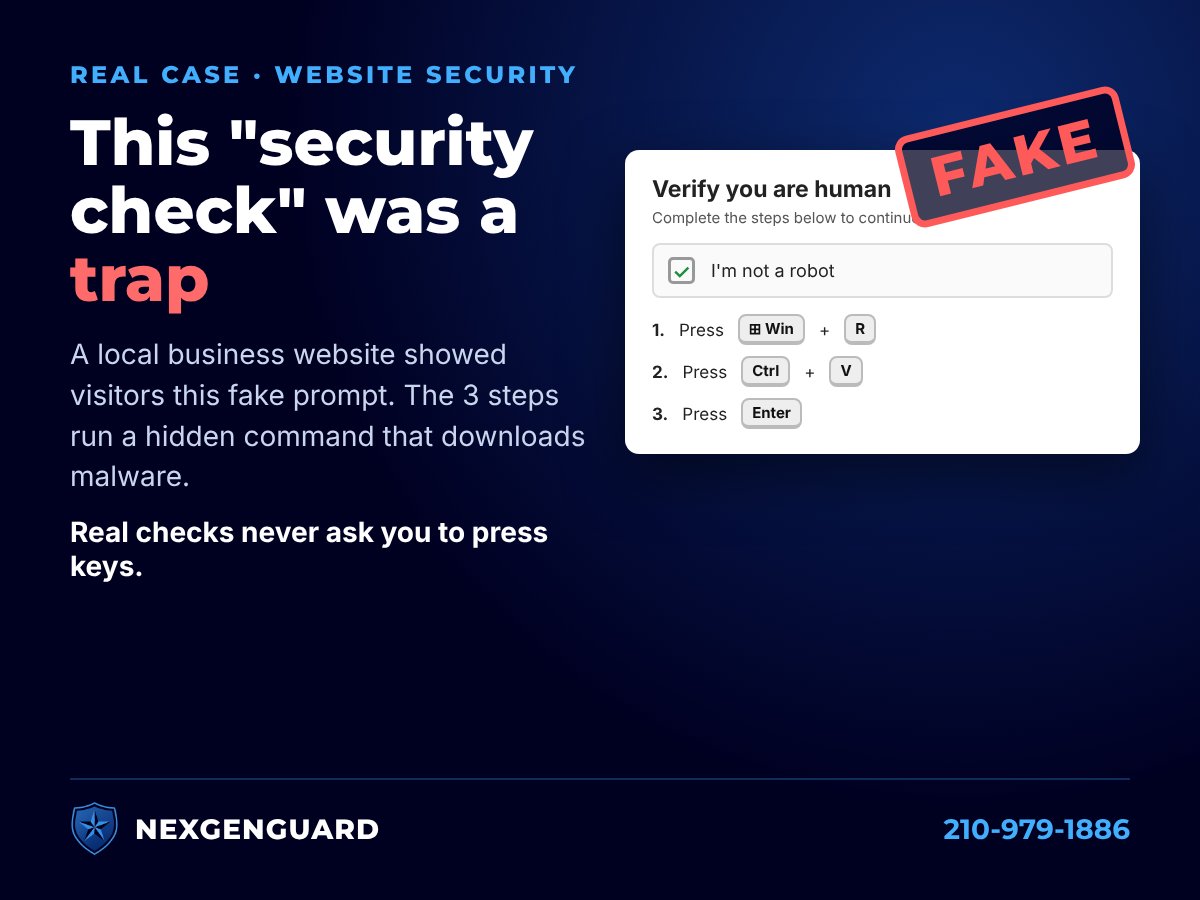
What visitors saw
When someone found the business on a search engine and clicked through, the site showed what looked like a normal "Verify you are human" checkbox, styled to look like a familiar website security service. After the visitor clicked it, the page told them to:
- Hold the Windows key and press R
- Press Ctrl + V
- Press Enter
Those three steps open the Windows Run box, paste a command the website had secretly copied to the visitor's clipboard, and run it. In this case the hidden command was a PowerShell instruction to download a program from the internet. A real security check never asks you to press keys or paste anything.
Why nobody at the office noticed
The fake check only appeared for visitors who arrived from a search engine. Anyone who typed the web address directly, like the owner and staff, saw the normal website. That's deliberate: it keeps the people most likely to report the problem from ever seeing it.
Google had not flagged the site as dangerous yet, so nothing warned visitors either.
This is a known attack called "ClickFix"
Security researchers call this technique ClickFix. Microsoft reports that ClickFix campaigns target thousands of devices around the world every day, and that the programs it installs most often are "infostealers": malware that steals saved passwords, browser data and other information (Microsoft Security blog).
In May 2026, the Australian Cyber Security Centre warned about this exact pattern on hacked WordPress websites: injected code replaces the page with a fake verification prompt and copies a malicious PowerShell command to the visitor's clipboard (ACSC advisory).
How the website was likely broken into
The site ran on WordPress, and its contact-form plugin was about three years out of date. Several serious security holes have been published for older versions of that plugin, including ones that let an attacker upload files without logging in. That's the most likely way in, though the web host's logs are needed to confirm it. We also found five website login accounts that anyone could see listed publicly, including one simply named "admin."
The fix started the same day: take the site offline so it stops attacking visitors, keep a copy as evidence, find and remove the injected code, restore a clean version, update everything, and change every password.
The other two problems we found
A compromised website is rarely the only issue. In the same review we found:
- Someone else had access to an email account. About an hour after a phishing email arrived, two unknown computers were connected to the account, and the same phishing email went out to the rest of the staff. Later sign-ins came from three other states through rented servers. The intruder got past two-step verification by reusing an existing login session, so no prompt ever appeared on the owner's phone.
- Real client inquiries were being blocked. The website's contact form sent its emails in a way that failed the business's own email security checks, so Microsoft 365 quarantined them as fake. In 30 days, 12 inquiries were quarantined and 9 were never delivered, with no alert to anyone. One missed message cost the business a client.
We did not loosen the email security settings to "fix" the form. Those same settings were blocking about 20 phishing emails made to look like they came from the business. The right fix is making the website send its mail properly.
What every business with a website should do
- Search for your own business on Google, Bing and DuckDuckGo and click through to your site, the way a customer would. Don't just type your address.
- Keep WordPress, plugins and themes updated, and delete plugins you don't use.
- Remove old website accounts, especially ones for past vendors, and turn on two-step verification for every admin.
- Know who manages your website and make sure someone is responsible for updates and backups.
- Turn on quarantine alerts in Microsoft 365 so legitimate mail can't disappear silently.
What everyone should know
If any website, pop-up or "security check" asks you to press Windows + R, open PowerShell or Terminal, or paste something and press Enter, stop and close the page. The Australian Cyber Security Centre's advice is simple: never copy, paste or run commands from websites or pop-ups. If you already did, disconnect from the internet and call your IT provider.
Want us to check your site?
NexGenGuard is a family-owned IT and cybersecurity company in San Antonio. We can check your website, email security and Microsoft 365 sign-ins as part of a free IT security audit, or call 210-979-1886.
